Storage & Fair Use: Understanding Your Limits
Learn about the storage and bandwidth limits for your Postion account, and how to manage your usage effectively.
To ensure high performance and a smooth experience for all creators, Postion provides flexible storage and bandwidth usage.
1. Storage Capacity
Postion no longer enforces a hard cap on storage space for your media assets (images, videos, documents). We want you to focus on creating great content without worrying about megabyte limits.
- Storage Policy: Unlimited (subject to Fair Use).
- Checking Usage: You can still monitor your total used space in the Storage section of your dashboard.
Fair Use Policy
While we don't have hard limits, we ask that you use storage responsibly:
- Site Files Only: Storage should only be used for assets directly relevant to your Postion sites.
- No File Hosting: Postion is not a general-purpose file hosting or backup service.
- Optimization: We recommend optimizing large files to ensure fast loading times for your visitors.
Future Adjustments: In the future, we may introduce limits based on CDN delivery or Bandwidth rather than raw storage space to better reflect the costs of serving content globally.
2. Bandwidth Quota
Bandwidth is the amount of data transferred when visitors view your site.
- Fair Usage Policy: We generally do not enforce strict bandwidth caps for normal usage. However, sites with extremely high traffic (e.g., millions of views per month) may be contacted to discuss enterprise solutions.
3. Email Quota
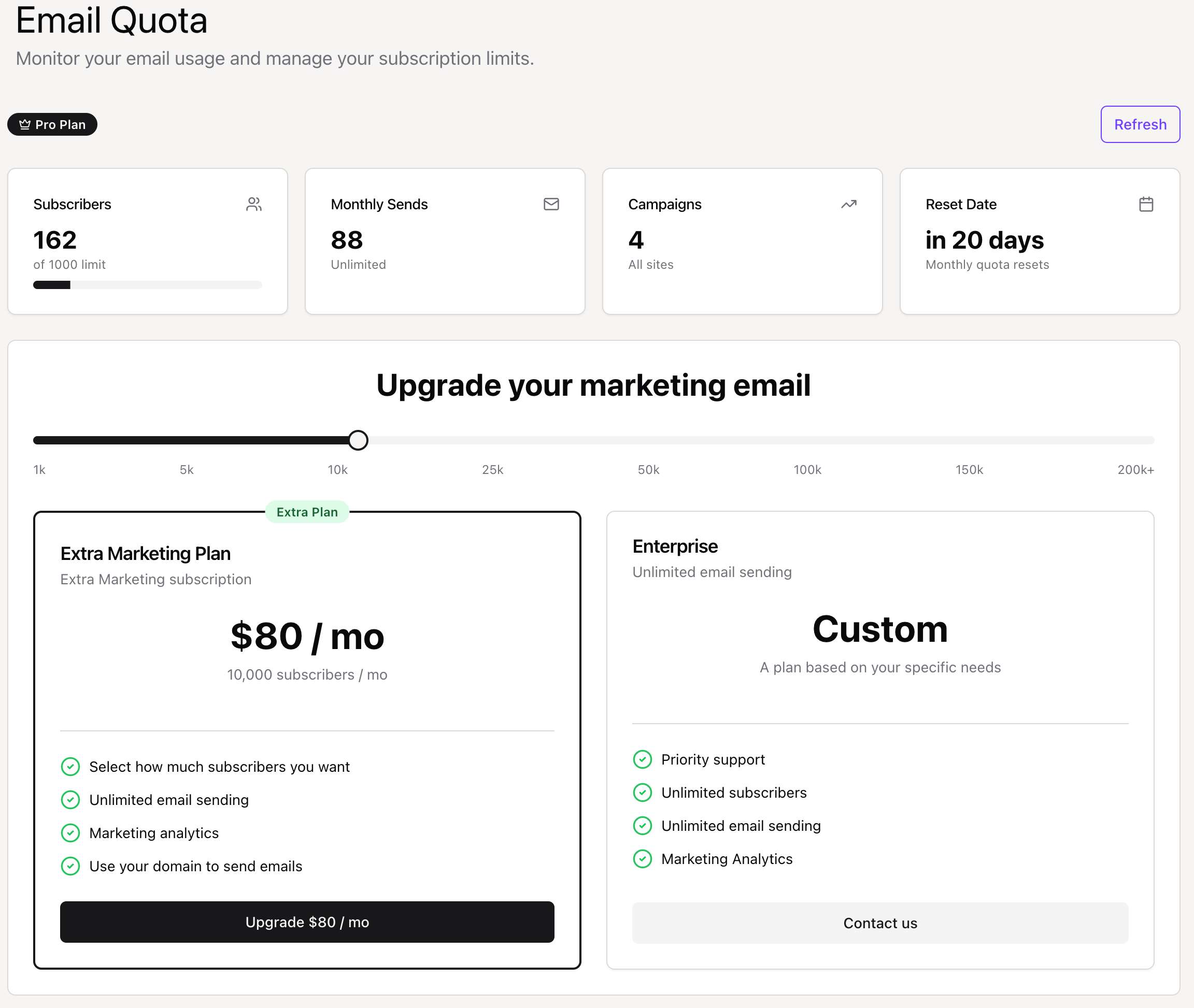
Your Email Quota determines how many subscribers you can have and how many emails you can send.
- Checking Usage: Go to Settings -> Quota in your main dashboard.
- Plan Limits:
- Free Plan: Email marketing is not included (0 subscribers).
- Launch Plan: 500 subscribers, Unlimited sends.
- Pro Plan: 1,000 subscribers, Unlimited sends.
- Enterprise: Unlimited subscribers, Unlimited sends.
Addons
Need more subscribers? You can purchase Marketing Addons to increase your limit (e.g., +1k, +5k, +10k subscribers).
Overages: If you reach your subscriber limit, you will need to upgrade your plan or purchase an addon to add more subscribers.
4. Email Sending Limits
In addition to subscriber limits, there are monthly limits on how many emails you can send.
Sending Quota by Plan
| Plan | Monthly Send Limit | Notes |
|---|---|---|
| Free | 500 emails | Good for testing |
| Launch | 5,000 emails | ~10 emails per subscriber per month |
| Pro | 25,000 emails | Ideal for frequent newsletters |
| Enterprise | Unlimited | Custom limits available |
What Counts as a Send?
- Each individual recipient = 1 send
- Sending to 100 subscribers = 100 sends
- Failed deliveries still count
Checking Email Usage
- Go to Dashboard → Email Quota
- View:
- Emails sent this month
- Quota remaining
- Next reset date
Quota Resets: Email quotas reset on the 1st of each month (or your billing anniversary).
5. Storage Infrastructure
Your files are stored securely using enterprise-grade cloud infrastructure.
Storage Backend
☁️ AWS S3 / Cloudflare R2
Industry-standard object storage with 99.99% durability.
🌐 Global CDN
Your files are served from edge locations worldwide for fast loading.
Supported File Types
| Category | Formats | Max Size |
|---|---|---|
| Images | JPG, PNG, GIF, WebP, SVG | 10MB |
| Documents | PDF, DOC, DOCX | 25MB |
| Audio | MP3, WAV, M4A | 50MB |
| Video | MP4, WebM | 100MB |
Pro Tip: Optimize images before uploading. A 500KB image looks the same as a 5MB image but loads 10x faster!
6. Quota Management Best Practices
Storage Tips
Audit Regularly: Review your media library monthly and delete unused files
Optimize Before Upload: Use image compression tools (TinyPNG, Squoosh)
Use External Video: Embed YouTube/Vimeo instead of uploading large videos
Clean Old Drafts: Published posts may have orphaned draft images
Email Tips
- Segment strategically: Don't send every email to your entire list
- Quality over quantity: 2 great newsletters beat 10 mediocre ones
- Clean your list: Remove bounced emails to maximize effective sends
7. Upgrading Quotas
Purchase Addons
If you need more capacity without upgrading your entire plan:
- Go to Dashboard → Storage or Email Quota
- Click "Purchase Addon"
- Select the addon size you need
- Complete payment via Stripe
- Addon is applied immediately
Addon Pricing
| Type | Size | Price |
|---|---|---|
| +5,000 sends | $10/month | |
| +25,000 sends | $35/month | |
| Subscribers | +5,000 subs | $15/month |
Pro Tip: Annual plans include bonus storage. Check our pricing page for current offers.
8. Monitoring & Alerts
Stay ahead of quota limits with proactive monitoring.
Automatic Alerts
We send email notifications when you approach limits:
| Usage Level | Alert |
|---|---|
| 75% | Friendly reminder |
| 90% | Upgrade recommendation |
| 100% | Action required |
Dashboard Indicators
Your dashboard displays quota status with visual indicators:
- 🟢 Green: Under 75% usage
- 🟡 Yellow: 75-90% usage
- 🔴 Red: Over 90% usage
FAQ
Is there a limit on storage?
We currently do not enforce a hard limit on storage space. However, use must comply with our Fair Use policy.
Can I still buy storage addons?
Storage addons have been discontinued as we've moved to a more flexible model. If you previously purchased an addon, it will no longer be billed.
Why do I still see usage stats?
Monitoring your usage helps you understand your site's footprint and prepare for potential future adjustments related to bandwidth or CDN costs.