Postion
  • 社区动态
  • 定价标准
控制台
登录账号
Discord

基础入门

总览介绍为什么选择 Postion?核心概念快速入门指南搬家与迁移控制台指南新用户必看如何赚钱

创作者专区

站点管理写作与编辑Postion 编辑器品牌与定制化界面风格指南SEO 搜索引擎优化社交分发工作流模板市场商业化变现内容访问与定价订阅模式Stripe 支付接入其他收入来源提现与手续费数据分析高级数据分析邮件营销推荐返利机制导出数据CRM 粉丝管理CRM 标签指南CRM 客户分群

共建社区

社区准则早期采纳者红利如何参与

技术开发支持

平台架构Postion 底层原理绑定自定义域名Webhooks 钩子公开 API 接口文档存储限制与配额

其他

常见问题解答疑难解答与排错
文档
Setting Up a Custom Domain

Setting Up a Custom Domain

Connect your custom domain to Postion to build brand trust and boost your SEO. A professional, branded URL is key for long-term audience growth.

Connect Your Custom Domain

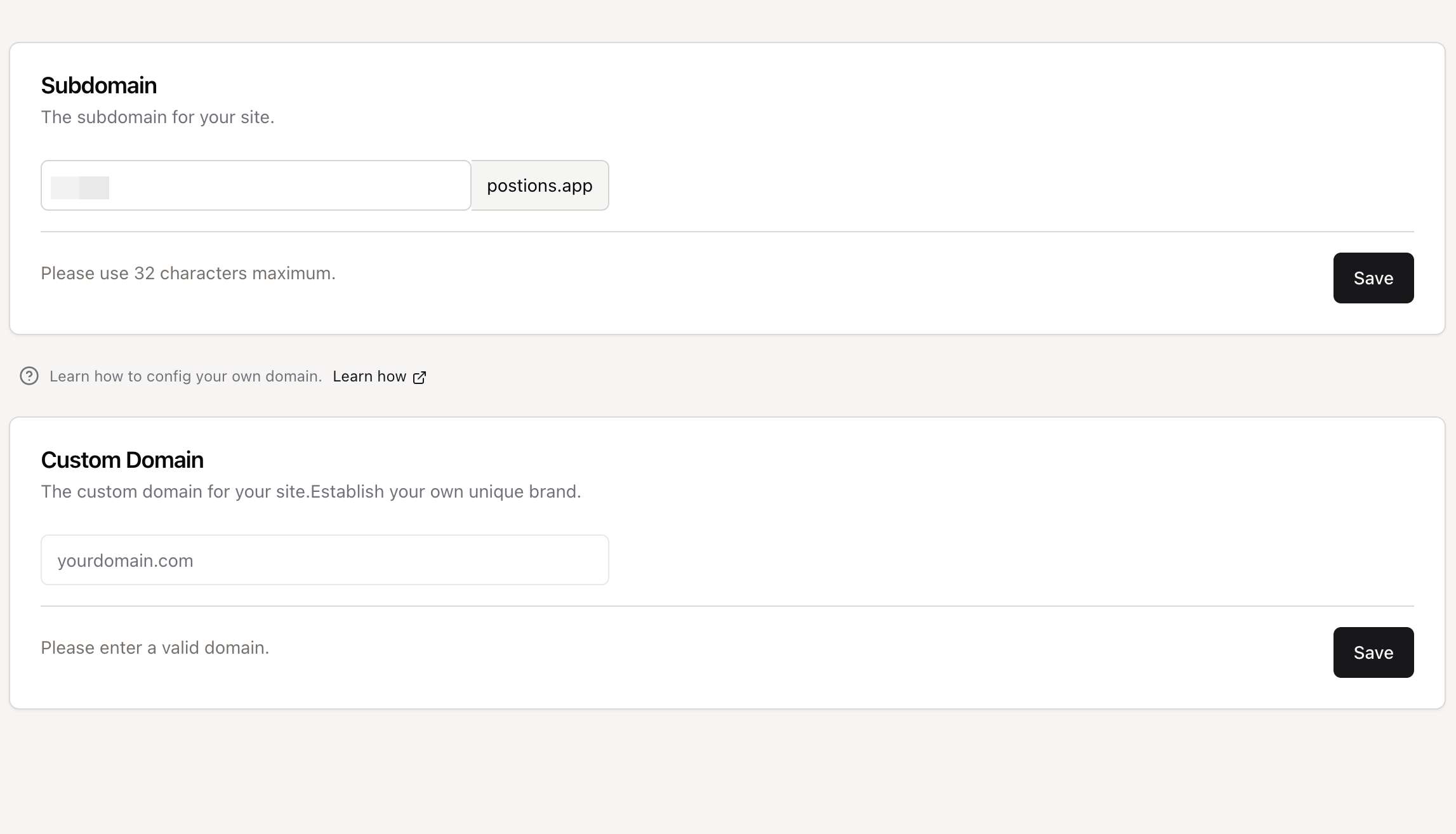
Custom Domain

Using a custom domain (e.g., blog.yourname.com) instead of the default subdomain (yoursite.postions.app) is a great way to build your brand and improve credibility. This guide will walk you through the process of connecting your domain to your Postion site.

The process involves creating a CNAME record in your domain's DNS settings.

Why do we use a CNAME record?
We exclusively use the CNAME method because it's the most secure and reliable way to connect your domain. It allows us to automatically apply security updates, performance improvements, and route your traffic through our global network without ever requiring you to update a server IP address. This ensures your site remains fast, secure, and always online.

Step-by-Step Guide

Step 1: Go to Your Domain Registrar's DNS Settings

Log in to the account where you purchased your domain (e.g., GoDaddy, Namecheap, Google Domains, etc.). Navigate to the DNS management section for the domain you want to connect.

Step 2: Create a CNAME Record

You will need to add a new DNS record with the following details. The labels for these fields may vary slightly depending on your provider.

  • Type: Select CNAME.
  • Host (or Name, Alias): Enter the subdomain you want to use.
    • For blog.yourdomain.com, enter blog.
    • For www.yourdomain.com, enter www.
  • Value (or Points to, Target, Destination): Enter cname.postions.app

Here’s an example of what the configuration should look like:

Example CNAME Record

Type
Name
Value
CNAME
blog
cname.postions.app

Special Instructions for Cloudflare Users

If your domain is managed through Cloudflare, there is one critical extra step to avoid a common error.

Crucial Step: Disable the Cloudflare Proxy

When adding the CNAME record in your Cloudflare DNS dashboard, you must ensure the Proxy status is set to DNS only. This is represented by a gray cloud icon.

Do NOT use the orange cloud (Proxied). Using the orange cloud will cause your site to be inaccessible and display an error. This is required by Cloudflare's security policy for this type of setup.


Correct Configuration (Gray Cloud):

Step 3: Wait for DNS Propagation

After you've saved your CNAME record, it can take some time for the changes to propagate across the internet. This process can take anywhere from a few minutes to, in rare cases, up to 48 hours, but it's typically quite fast.

You can check the status of your DNS propagation using a tool like whatsmydns.net.

Step 4: Add Your Custom Domain in Postion

Once your CNAME record is set up, the final step is to add the domain in your Postion dashboard:

  1. Navigate to your Site Settings.
  2. Go to the Domains tab.
  3. Enter your full custom domain (e.g., blog.yourdomain.com) and click Add Domain.

Our system will automatically verify your DNS settings and provision an SSL certificate for your domain, ensuring it is secure (HTTPS).

✅ DNS Verified

Our system will confirm that your CNAME record is pointing to Postion correctly.

🔒 SSL Certificate Issued

We automatically issue and renew a free Let's Encrypt SSL certificate for you.

Frequently Asked Questions

Why can't I use an A record to point to an IP address?

This is a great question and it comes down to security and reliability. Exposing a direct server IP address (which an A record does) would create a significant security risk for our entire platform and all of our users. It would also mean that if we ever need to upgrade our server infrastructure, your site could go offline until you manually update the IP address.

By using a CNAME record, we can manage all of that for you behind the scenes. Your domain points to a stable address, and we handle the rest, ensuring your site is always protected, performant, and pointing to the right place. It’s the industry-standard best practice for modern SaaS platforms.


If you encounter any other issues, please double-check your CNAME record settings or contact our support team for assistance.

上一页Postion ...
下一页Webhooks ...
Postion

写下专属于你的篇章

TwitterGitHubDiscordDiscordInstagram

探索

  • 控制台
  • 社区
  • 价格
  • 帮助文档
  • 常见问题

公司

  • 更新日志
  • 开发路线图
  • 联系我们
  • 加入我们
  • 官方博客

资源

  • 邀请机制
  • 快速入门
  • 什么是 Postion
  • 控制台指南
  • 公开 API 指南

支持与服务

  • 关于 Postion
  • 加入 Discord
  • BuouUI 项目
  • 站点地图
  • 博客 RSS

© Postion 2026 — BuouTech Inc.

版本说明无障碍隐私政策服务条款